


Word Solitaire Together
4.822.00 Reviews
App Specs
- Version
- 2.2.2
- Updated On
- License
- Free
- Downloads
- 500,000+
- Developer
- Pop Go
- Categories
- Word
- Platform
- Android
Screenshots
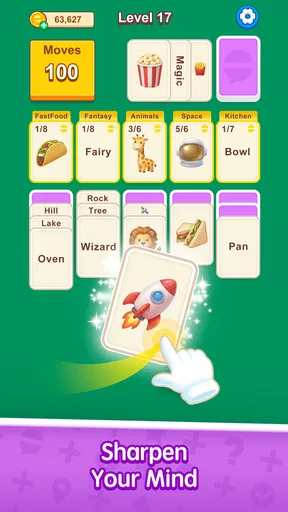
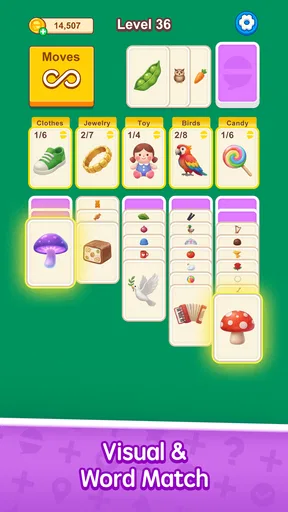

 Analysis by AppCompare
I like the basic promise of Word Solitaire Together: it brings letter-based word making into a solitaire-style layout, so a turn asks for more than spotting a word or moving cards. You need to look at what is available, make a choice, and think about how that choice affects the rest of the board. If you enjoy word puzzles but want a more tactile, card-table feel, that combination is an appealing place to start.
It is a free word game from Pop Go, with optional in-app purchases priced from $1.99 to $59.99 per item. The game is rated Teen, has a 4.6 average from around 190 ratings, and has been installed over 10,000 times. It was released on February 3, 2026; version 1.1.5 supports Android 7.0 and later. Those details help set expectations: this is a relatively new title with a modest audience, not a long-established word-game giant. I’d approach it as a focused puzzle to try, rather than assuming it already has the scale or community of a major multiplayer game.
Learning the Board One Move at a Time
When I first opened a game with this format, the most useful thing was to treat the layout as a puzzle rather than rush to make the first word I noticed. Letters are presented in a solitaire arrangement, and forming words is the central way to clear the board. That means a tempting short word may not always be the best move if it uses letters that could help uncover or connect other choices. A quick scan before moving can make the difference between a board that opens up and one that feels awkward.
What to Expect from the Word-and-Card Mix
So, what exactly is Word Solitaire Together? Imagine the classic game of solitaire, but instead of numbers, you’re dealing with letters. The goal is to form words with these letters to clear the board. It's like putting your vocabulary and strategic thinking to the ultimate test. I found myself getting lost in it for hours, trying to outdo my previous scores.
The appeal is in switching between two kinds of attention. I look for words, but I also have to keep track of how the cards are arranged and which move seems most useful. That makes the game feel different from a standard word search, where the path is usually about finding a fixed word in a grid, or a crossword, where clues guide each answer. Here, the challenge comes from working with the letters and layout in front of you. If you prefer clear clues and a single correct answer, a crossword may feel more satisfying; if you like making your own choices, this format is a better fit.
It is also different from ordinary number-based solitaire. Familiar card layouts can make the first few moments feel recognizable, but the vocabulary element changes the decision-making. I would not assume that a strong solitaire player automatically has an advantage: finding a playable word and judging whether it is a wise move are separate skills. Likewise, someone with a large vocabulary may still need to slow down and read the board carefully.
Getting Started and Finding a First Useful Move
The game starts with a deck of cards laid out in the familiar solitaire layout. Each card has a letter, and your task is to create words by arranging these cards. It’s surprisingly intuitive, and the interface makes it easy to drag and drop letters. I appreciated how smooth the mechanics were—I never felt frustrated with the controls.
Worth Reading Before You Choose

Baby Panda World Brings Quick Play to Modern Phones, but Its Game Library Feels Busy

ESPN’s Live Game View Makes Following Close Games Easier

QuizzLand Review: A Good Fit for Short Trivia Breaks, Not Every Player

Basketball Stars: Multiplayer Is Fast, but Can It Recover When Matches Go Wrong?

WEBTOON Turns Phone Updates Into a Better Reading Routine

Link to Windows Runs on Shared Habits, Not Social Feeds
For a first session, I’d begin by checking which letters are actually available to move, then look for more than one possible word before committing. That small pause is useful because a move can be valid without being especially helpful. A short, obvious word may clear something, but another option might make better use of the exposed letters. Treating the first board as a chance to learn how cards uncover and interact is less stressful than chasing a perfect result immediately.
A practical routine is to scan the board in two passes: first for words you can make now, then for the cards that each choice would leave accessible. This is not a hidden feature or a guaranteed winning method; it is simply a way to avoid tunnel vision. I find it especially helpful when several familiar words jump out at once. The best choice is not always the longest word I can spot, but the one that leaves me with more workable options afterward.
That approach also gives a reassuring first success. Instead of judging a round by a score, aim to make one deliberate word and notice what changes on the board. Once the result of that move makes sense, the game’s central loop becomes easier to read. If the layout still feels busy, pause and identify the available letters rather than dragging pieces at random; the simple controls help, but thoughtful selection is what makes the puzzle click.
Hints, Pace, and the Small Decisions That Matter
One feature that stood out to me was the hint system. If you find yourself stuck, you can use a hint to get a nudge in the right direction. But use them wisely; they’re limited!
Because hints are limited, I would save one for a genuine dead end rather than spend it whenever I hesitate. First, check whether you have overlooked a short word or a less obvious combination among the available letters. If you still cannot see a useful move, a hint can restore momentum instead of turning every pause into a guessing session. The trade-off is straightforward: using help can keep a round moving, but leaning on it too quickly takes away some of the satisfaction of finding the pattern yourself.
The game seems best suited to brief, focused sessions. A round gives you a contained puzzle to return to when you have a little time, while the strategic element rewards attention more than frantic tapping. For example, I could imagine opening it during a quiet wait or taking a short break between chores: look over the board, make a considered move, and stop when the moment is over. I would not choose it when I need a game that can be played entirely on autopilot, since the point is to keep evaluating letters and consequences.
One useful personal rule is to decide in advance whether a session is about relaxing or improving. When I am unwinding, I can take the obvious word and enjoy clearing the layout. When I want a more thoughtful challenge, I can compare possible words and save hints. Keeping those goals separate prevents a casual round from becoming frustrating just because I am not playing for an ideal outcome.
Playing with Friends and Choosing the Right Audience
Now, here’s where the “Together” part comes in. You can invite friends for a friendly competition or team up to tackle challenges. It adds a social dimension that’s often missing in word games. I had a blast playing with my friends, and it definitely added a layer of excitement to the experience.
The social side is a good reason to try it if you already have someone who enjoys word puzzles. A shared challenge can turn the same letter-and-card problem into a light conversation: compare the words you noticed, explain why you made a move, and see how another person approaches the layout. That is a different kind of appeal from playing against a computer opponent or competing on a public leaderboard. If you mostly want a quiet solo puzzle and have no interest in inviting anyone, the core word-solitaire idea is still the main reason to play.
I would be cautious about choosing it specifically for a large, always-active online community. The audience is still relatively small compared with the biggest games in the category, and the available rating count reflects that. A friend-to-friend session is a more sensible expectation than assuming there will always be strangers ready to play. If dependable matchmaking or a huge pool of opponents is essential to you, a more established competitive word game may suit you better.
It is a natural fit for people who like casual competition without wanting a reflex test. You can take time to consider letters, and the social angle gives familiar puzzles a shared purpose. It may be less appealing to players who dislike word games, prefer fixed clue-based puzzles, or want a deep collection of solo modes. I would also steer away from it if you expect every feature to be free: the game costs nothing to download, but optional purchases are available, so it is sensible to review any purchase choice before confirming it.
Presentation and Everyday Comfort
The visuals are crisp and clean, with a minimalist design that doesn’t distract from the gameplay. The soothing background music is a nice touch, making it easy to relax and focus on forming words. Even after long sessions, I didn’t feel any strain, which is a big plus in my book.
That restrained presentation suits a game where the letters and their positions need to stay readable. The important question during play is what the board lets me do, not whether the screen is competing for attention with elaborate effects. I would still adjust my own play habits to the setting: if I am somewhere that calls for quiet, I can keep the sound low or off and rely on the visual puzzle. The music is pleasant, but it is not the reason I would recommend the game.
For a first-time player, a calm interface also makes it easier to learn by observation. I can watch what changes after a move and build a mental picture of how to approach the next one. This is more valuable than flashy feedback in a puzzle game, particularly when I am still figuring out whether a word has cleared the cards I expected. The clean look supports that learning process without making the mechanics feel more complicated than they are.
What to Keep in Mind Before You Commit
If you’re still on the fence, let me highlight why this game deserves your attention. It’s a perfect blend of strategy and wordplay, offering a unique challenge that keeps you coming back for more. Plus, the social aspect adds a fun twist that makes it more engaging than your typical solo games.
I would soften one part of that enthusiasm: whether it keeps you coming back depends on what you want from a word game. Its strongest draw is the particular mix of arranging letter cards, looking for words, and deciding when to use help. Someone who wants a fresh puzzle loop and the option to involve friends has a clear reason to give it a try. Someone looking for extensive story content, a broad set of modes, or a proven high-traffic competitive scene should compare it with alternatives before settling in.
The free entry point makes trying a few rounds straightforward, but the in-app purchase range is wide, from $1.99 to $59.99 per item. I would treat spending as entirely optional and avoid buying anything simply because I had a difficult board. First decide whether the basic play is enjoyable and whether the social features matter to you; only then consider whether a purchase offers something you personally want. This is a more sensible way to approach any free-to-start game than assuming the first download commits you to spending.
Age suitability is another practical point for families. The game carries a Teen content rating, so I would check that rating against the person who will use it rather than assuming that a word-puzzle theme automatically makes it suitable for every age. For an older teen or adult who likes vocabulary challenges, the format is easy to understand. For younger children, a simpler word game chosen specifically for their age may be a better starting point.
On Android, the listed minimum operating-system requirement is version 7.0, and the current release is 1.1.5. That gives Android users a concrete compatibility check before downloading. If you are considering it on another platform, check the relevant store for your device’s current requirements and availability. I would also keep expectations realistic for a title that is still building its audience: judge the experience you can play now, rather than relying on assumptions about future content or community growth.
Who Will Enjoy It, and When I’d Choose Something Else
Whether you’re a word game enthusiast or just looking for something new to try, Word Solitaire Together is definitely worth downloading. You’ll find it on both Android and iOS, so no matter your device, you’re good to go. Happy word crafting!
For me, the clearest recommendation is for someone who enjoys making decisions at an unhurried pace and likes seeing letters turn into a board-clearing plan. It is also worth considering if you and a friend want a word-game activity you can share rather than simply taking turns on a standard crossword. The combination is specific enough to feel different from familiar word searches, while the solitaire layout gives the puzzle a visual structure that is easy to understand once you start moving cards.
I would skip it if you mainly want a conventional solitaire game with numbers, a crossword guided by clues, or a word search with a fixed grid. Those alternatives each offer a more focused version of their own format. I would also pick a larger multiplayer title if my priority were finding opponents at any hour, or a richer single-player word game if I wanted a long campaign. This one makes most sense when its central letter-card puzzle is exactly the kind of small challenge I want.
My first-session advice is simple: take a moment to scan the board, make one move you understand, and notice how that changes your choices. Save a hint until you have genuinely run out of ideas, and try a friend session if the social element is part of the attraction. If that rhythm feels satisfying, there is enough of a distinctive twist here to justify keeping it on your device. If you find yourself wishing the letters came with clues or the game offered a different kind of progression, that is a useful sign to choose a word game built around those preferences instead.
Pros
- Engaging multiplayer mode available.
- Beautiful
- intuitive user interface.
- Challenging puzzles increase difficulty.
- Minimal ads enhance gameplay experience.
- Regular updates with new features.
Cons
- Limited free hints available.
- Requires constant internet connection.
- In-app purchases can be pricey.
- Occasional lag in multiplayer mode.
- No offline play option available.
FAQs for Word Solitaire Together
What is Word Solitaire Together and how does it work?
Word Solitaire Together is a unique blend of solitaire and word puzzle games. Players are tasked with creating words from a deck of cards, each containing a letter. The goal is to use strategy and vocabulary skills to clear the board by forming words. The game offers both single-player and multiplayer modes, allowing you to compete with friends or enjoy solo challenges.
Is Word Solitaire Together free to play?
Yes, Word Solitaire Together is free to download and play. However, the game may offer in-app purchases for additional features or items, such as hints or extra card decks. These purchases are optional and are not required to enjoy the full game experience.
What are the system requirements for Word Solitaire Together?
Word Solitaire Together is compatible with most modern Android and iOS devices. It requires iOS 10.0 or later for Apple devices and Android 5.0 or higher. Make sure your device has at least 100 MB of free storage space to accommodate the app's size and future updates.
Can I play Word Solitaire Together offline?
Word Solitaire Together offers offline gameplay for its single-player mode, allowing you to enjoy the game without an internet connection. However, to access the multiplayer features and compete with friends, an internet connection is required.
How can I invite friends to play Word Solitaire Together?
To invite friends, you can connect your game account to social media platforms such as Facebook. Once connected, you can easily invite friends to join you in multiplayer matches. Alternatively, you can share your unique game code with friends so they can join your games directly.


